

You have three seconds. That is how long a visitor waits before leaving your site if it has not loaded. After three seconds, 53% of mobile users bounce, and they rarely come back. If your website is slow, you are not just annoying your visitors; you are handing them to your competitors and telling Google your site is not worth ranking highly.
These [website speed optimization tips] are not theoretical. Every point in this guide is something our web development services team at VirtueNetz implements in real projects for real businesses. Whether your site is on WordPress, Shopify, or a custom platform, you can apply most of these changes today, many without touching a line of code.
⚡ Google’s own data: a 1-second delay in mobile page load time reduces conversions by up to 20%. A site that scores 90+ on PageSpeed Insights consistently outranks competitors with identical content but slower load times.
What Is Website Speed Optimization, and Why Does Google Care So Much?
Website speed optimization tips fall under a broader practice of improving how fast your web pages load and become interactive for real users. Google has made page speed a confirmed ranking factor since 2010 for desktop and 2018 for mobile. In 2021, they took it further with Core Web Vitals, three specific performance metrics that now directly influence where you appear in search results.
You can measure your current site speed using Google PageSpeed Insights, which gives you a score from 0 to 100 and tells you exactly what is slowing your site down. A score of 90 or above puts you in a strong position. Below 50 is a problem that is actively costing you rankings and customers.
According to Google Search Central’s page experience documentation, speed affects not only where you rank but also how prominently you appear in features like Top Stories and Google Discover. For businesses investing in SEO services in Pakistan, ignoring page speed is like building a well-optimized house on a slow road.
Understand Core Web Vitals: Google’s Speed Report Card
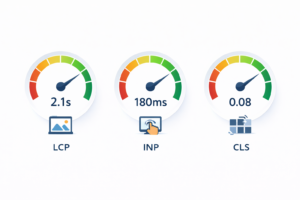
Before diving into the website speed optimization tips, you need to know what Google is actually measuring. The Core Web Vitals are three metrics that define whether your site is fast enough from a real user’s perspective:
| METRIC | WHAT IT MEASURES | GOOD TARGET | WHAT CAUSES POOR SCORES? |
| LCP: Largest Contentful Paint | How long until the biggest visible element (hero image/headline) loads | Under 2.5 seconds | Large uncompressed images, slow server, render-blocking JS |
| INP Interaction to Next Paint | How fast your site responds when a user clicks, taps, or types | Under ms | Heavy JavaScript, third-party scripts, unoptimised event listeners |
| CLS Cumulative Layout Shift | How much the page ‘jumps’ visually as it loads—buttons moving, text shifting | Under 0.1 | Images without set dimensions, late-loading fonts, ads injected dynamically |
12 Website Speed Optimization Tips You Can Implement Right Now
Tip 1: Compress Every Image Before Uploading
Images are the single biggest cause of slow websites. A full-resolution photo from a smartphone or camera can be 4MB to 8MB. On a webpage, that same image should be under 150 KB and often under 80 KB without any visible quality loss.
- What to do: Before uploading any image to WordPress or your CMS, compress it using TinyPNG (free, handles PNG and JPG). For bulk compression on an existing site, install the ShortPixel plugin and process all media in one batch.
- Format matters: Use WebP instead of JPG or PNG wherever possible. WebP files are 25–35% smaller with the same visual quality. WordPress 5.8+ generates WebP automatically if your hosting supports it.
- Lazy loading: Add loading=’lazy’ to all images below the fold. This means images only download when the visitor scrolls near them, dramatically cutting the initial page load time. WordPress adds this by default since version 5.5.
✅ Expected improvement: Compressing images alone typically improves PageSpeed score by 10–25 points and cuts page weight by 40–60%.
Tip 2: Enable Browser Caching
When someone visits your site for the first time, their browser downloads everything: HTML, CSS, JavaScript, images, and fonts. Browser caching tells the browser to store these files locally so that on the next visit, it loads them from the user’s device instead of your server, making the second visit near-instant.
- For WordPress: Install WP Rocket or W3 Total Cache. Both configure browser caching automatically with a few clicks. Set expiry headers to at least 1 year for static assets like images and fonts.
- For custom sites: Add cache-control headers in your. htaccess file or server configuration. Your developer can do this in under 10 minutes.
- For eCommerce: Our eCommerce website development team always configures caching at build time; it should never be an afterthought on a product-heavy site.
Tip 3: Minify Your CSS, JavaScript, and HTML
Every stylesheet and script file your site loads contains whitespace, comments, and formatting that make the code readable for developers but add unnecessary bytes for every visitor. Minification strips all of that out, reducing file sizes by 10 to 30 percent. For dynamic website development, where multiple scripts interact, minification is especially important.
- WordPress: WP Rocket → File Optimization → enable ‘Minify CSS’ and ‘Minify JavaScript.’ Start with CSS; it is always safe. JavaScript minification occasionally breaks plugins, so test on staging first.
- Custom builds: Use tools like Webpack, Vite, or Parcel during your build process. These bundle and minify automatically. If your site is not using a build tool, ask your developer it is a one-time setup that pays dividends permanently.
- HTML: Most caching plugins also minify HTML output. Enable this alongside CSS and JS minification.
Tip 4: Use a Content Delivery Network (CDN)
A CDN stores copies of your website’s static files (images, CSS, JS, and fonts) on servers in dozens of cities around the world. When someone in London visits your Lahore-hosted site, instead of the data travelling thousands of kilometers, it loads from the CDN server closest to them. Cloudflare offers a free plan that works with any hosting and can be set up in under 30 minutes.
- Best for: Any site with visitors from multiple countries. If you serve Pakistan, Saudi Arabia, the UAE, and the UK, a CDN is not optional; it is essential.
- Setup: Point your domain nameservers to Cloudflare. Enable ‘Auto Minify’ and ‘Rocket Loader’ in the Cloudflare dashboard. Switch SSL to ‘Full (Strict)’ mode.
- Free vs. paid: Cloudflare’s free plan is sufficient for most small to mid-size websites. The Pro plan ($20/month) adds image optimization and better analytics.
💡 VirtueNetz configures Cloudflare CDN as standard practice on all international client projects. It is one of the highest-impact speed improvements with the lowest implementation effort.
Tip 5: Choose Hosting That Matches Your Traffic
The cheapest shared hosting plan puts your site on a server shared with hundreds of other websites. When any of those sites gets a traffic spike, yours slows down. If your business depends on its website, and it should, your hosting is not the place to cut costs.
- Shared hosting: Fine for small brochure sites with under 500 visits per month. Not suitable for growing businesses.
- VPS (Virtual Private Server): Your own allocated resources at PKR 3,000–8,000 per month. Suitable for most business websites with up to 10,000 monthly visits.
- Managed WordPress hosting: Kinsta, WP Engine, or Cloudways handles server optimization for you. More expensive but significantly faster out of the box.
- Our recommendation: DigitalOcean or AWS Lightsail on a managed plan for Pakistani businesses with international visitors. Our team handles server configuration for all clients.
Tip 6: Eliminate Render-Blocking Resources
When your browser loads a page, it reads the HTML from top to bottom. If it hits a CSS or JavaScript file, it stops everything and downloads that file before continuing. This is called ‘render blocking,’ and it directly delays when your visitor sees any content.
- Defer JavaScript: Add the defer or async attribute to non-critical script tags. In WordPress, WP Rocket handles this automatically under ‘File Optimization → Load JS Deferred.’
- Critical CSS: Extract the CSS needed to display above-the-fold content and inline it directly in the HTML. Load the rest asynchronously. This is a technical task but has a huge impact on Largest Contentful Paint scores.
- Remove unused CSS: Tools like PurgeCSS identify and remove stylesheet rules that are never triggered on your site. Page builders like Elementor often load thousands of unused CSS rules.
Tip 7: Your WordPress Plugins
Each active plugin on your WordPress site potentially adds HTTP requests, database queries, and JavaScript files to every page load. A site with 40 plugins will almost always be slower than one with 15, even if the individual plugins are well-coded. This is one of the most overlooked website speed optimization tips for WordPress-based businesses. Our content management services team audits plugin usage as part of every website performance review.
- Audit what you have: Go to Plugins → Installed Plugins. Deactivate and delete anything you are not actively using. Be ruthless; if you have not used it in 3 months, it goes.
- Use GTmetrix to see plugin impact: Run your site through GTmetrix before and after deactivating a plugin to measure its exact load time contribution.
- Replace heavy plugins: Contact Form 7 is lighter than Gravity Forms for basic contact forms. WP Rocket covers caching, minification, and lazy loading in one plugin, replacing three or four separate plugins.
Tip: Enable GZIP or Brotli Compression
Server-side compression reduces the file size of HTML, CSS, and JavaScript before it is sent to the browser; the browser then decompresses it locally. GZIP compression typically reduces file sizes by 70–80%. Brotli, a newer algorithm, achieves 15–25% better compression than GZIP.
- Check if you have it: Run your URL through GTmetrix and look at the ‘Enable compression’ recommendation. If it appears, compression is not enabled.
- Enable on WordPress: WP Rocket enables GZIP automatically. Alternatively, add GZIP rules to your . htaccess file: The hosting provider can do this in minutes.
- Brotli: Available on Cloudflare (enabled by default on all plans) and on Nginx servers. Ask your developer or hosting support to enable it.
Tip 9: Reduce HTTP Requests
Every element on your page—each image, each script, each stylesheet, each font—requires a separate HTTP request to your server. A page with 80 requests takes significantly longer to load than one with 30, even if the total file size is similar. Reducing requests is particularly impactful for mobile users on slower connections.
- Combine CSS files: If you have multiple separate stylesheets, combine them into one. Caching plugins often do this automatically.
- Use icon fonts or SVGs: Replace image-based icons with SVG icons or an icon font like Font Awesome. SVGs are vector-based, infinitely scalable, and add almost no weight.
- Remove social share buttons from every page: Social sharing widgets often load multiple third-party scripts. Add them only on blog post pages where they are actually useful, not sitewide.
Tip 10: Optimize Your Fonts
Custom web fonts make your site look polished, but if loaded incorrectly, they delay text rendering and cause Cumulative Layout Shift as the browser swaps from a system font to your custom font.
- Self-host your fonts: Download Google Fonts and serve them from your own server instead of loading them from Google’s CDN. This eliminates a third-party DNS lookup and gives you full control over caching.
- Use font-display: swap: This CSS property tells the browser to show text immediately in a fallback font while the custom font loads, then swap it in, preventing invisible text during load (FOIT).
- Limit font weights: Each font weight (regular, bold, italic) is a separate file. Load only what you actually use on your site. Most sites need Regular (400) and Bold (700), nothing else.
Tip 11: Optimize for Mobile. Google Indexes Mobile First
Google uses your site’s mobile version as the primary version for ranking. This is called mobile-first indexing, and it has been the default for all new sites since 2021. If your mobile site is slow, clunky, or missing content that your desktop version has, your rankings suffer across all devices. For local business SEO services and any site targeting Pakistan, where 70%+ of traffic is mobile, this is especially critical.
- Test your mobile score separately: Run your URL through Google PageSpeed Insights and check the Mobile tab specifically; it is often 20–30 points lower than desktop.
- Tap targets: All clickable elements (buttons, links, and menu items) should be at least 48×48 pixels. Google flags small tap targets as a mobile usability issue.
- No intrusive interstitials: Full-screen popups on mobile are a ranking penalty. If you use popups for lead capture, trigger them only on exit intent or after 30 seconds, not on page load.
Tip 12: Monitor Speed Just at Launch
Most businesses do a one-time speed fix and then forget about it. But as plugins update, content changes, new images get uploaded uncompressed, and new scripts get added, your speed degrades gradually. Setting up ongoing monitoring catches these issues before they affect your rankings. Our website maintenance services include monthly performance reviews using the tools below.
- Google PageSpeed Insights: Free. Run it on your 5 most important pages every month.
- GTmetrix monitoring: GTmetrix’s paid plan sends automated alerts if your site drops below a set performance threshold. £5/month is cheaper than one lost sale.
- Google Search Console: The ‘Core Web Vitals’ report in Search Console shows how your real-world visitors experience your site speed, not just a test environment. Check it weekly.
90+ on PageSpeed Insights mobile, LCP under 2.5s, INP under 200ms, CLS under 0.1. If you hit all four, you are in the top 20% of websites for performance.

How VirtueNetz Implements These Website Speed Optimization Tips for Clients
Reading a list of website speed optimization tips is one thing. Implementing them correctly on a live website without breaking anything is another. At VirtueNetz, we offer a structured performance audit and optimization service that covers every point in this article for your specific site.
Here is what we do in a typical speed optimization engagement:
- Full site audit: We run your top 10 most-trafficked pages through PageSpeed Insights, GTmetrix, and Chrome DevTools. We document every issue by priority and estimated impact.
- Image audit and compression: We compress and convert all existing images to WebP, configure lazy loading, and set up ShortPixel for all future uploads.
- Caching and CDN setup: We configure WP Rocket or your chosen caching plugin, set up Cloudflare CDN, and enable GZIP/Brotli compression.
- Code optimization: We minify CSS, JS, and HTML, defer non-critical scripts, and eliminate render-blocking resources. For complex sites, we rewrite critical CSS inline.
- Hosting review: If your current hosting is the bottleneck, we recommend a migration to a faster provider and manage the migration for you with zero downtime.
- Core Web Vitals target: We work until your site achieves 90+ on PageSpeed mobile. Most clients reach this in one to two weeks.
We have improved site speeds for healthcare website development clients, retail stores, professional services firms, and SaaS platforms. The process is the same; only the specific bottlenecks differ per site.
⚡ Is Your Website Slow? Get a Free Speed Audit From VirtueNetz.
We test your top 5 pages, identify every speed issue, and send you a prioritized fix list for free. → Get a free website speed audit | 📞 +92 315 7884477
Website Speed Is Not Just an SEO Issue; It Directly Affects Your Revenue
Here is why every business owner should care about the numbers behind website speed:
| STAT | SOURCE | BUSINESS IMPACT |
| 53% of mobile users leave a page that takes over 3 seconds to load | Google Research | Half your mobile visitors gone before seeing your content |
| A 1-second delay in load time reduces conversions by up to 20% | Google/Deloitte | PKR 10,000/day site: losing PKR 2,000/day to slow loading |
| Fast websites rank higher. Google has used speed as a ranking factor since 2010 | Google Official | Slow site = lower rankings = fewer visitors |
| Sites that score 90+ on Core Web Vitals have 24% lower bounce rates on average | Search Engine Journal | Visitors who stay = more leads, more sales |
| A 1-second improvement in LCP increases conversions by 3.4% | Cloudflare Data | Direct link between load speed and revenue |
Quick-Win Checklist: Start With These Today
If you only have an hour to implement website speed optimization tips, do these five things in this order; they give the highest return for the least effort:
| PRIORITY | ACTION | TIME NEEDED | EXPECTED SPEED GAIN |
| 🔴 1 | Compress all images and install ShortPixel, run bulk compression | 20 minutes | +15–25 PageSpeed points |
| 🔴 2 | Install WP Rocket to enable caching, minification, and lazy loading in one step | 15 minutes | +10–20 PageSpeed points |
| 🟡 3 | Add site to Cloudflare free plan to enable CDN, minify, and Rocket Loader | 30 minutes | +5–15 PageSpeed points |
| 🟡 4 | Convert images to WebP, enabled in ShortPixel settings or Cloudflare Polish | 5 minutes | +3–8 PageSpeed points |
| 🟢 5 | Deactivate and delete any plugin you have not used in the last 3 months | 10 minutes | +2–10 PageSpeed points |
Frequently Asked Questions About Website Speed Optimization
How do I check my website speed for free?
The best free tools are Google PageSpeed Insights (run it on both mobile and desktop tabs), GTmetrix (gives a waterfall chart showing exactly which files are slow), and Google Search Console’s Core Web Vitals report (shows real-world data from actual visitors). Run all three and compare results; they each surface different issues.
What is a good website speed score?
On Google PageSpeed Insights: 90–100 is Excellent, 50–89 is Needs Improvement, and 0–49 is Poor. Your target is 90+ on mobile, not just desktop. Mobile scoring is typically 15–25 points lower than desktop because Google simulates a mid-range phone on a 4G connection.
How long does website speed optimization take?
The quick wins of image compression, caching, and CDN can be done in 2 to 3 hours on a WordPress site and typically move your score from 50–60 up to 75–85. Getting to 90+ often requires deeper technical work: eliminating render-blocking resources, rewriting critical CSS, and addressing server response time. A thorough optimization engagement with our team typically takes 3 to 10 working days depending on site complexity.
Will improving website speed improve my Google ranking?
Yes, but speed is one of many ranking factors. Improving your Core Web Vitals scores removes a ranking penalty but does not override poor content or weak backlinks. The correct way to think about it: speed creates a ranking floor (below which Google penalizes you) rather than a guaranteed boost. Fix speed first, then invest in SEO services in Pakistan to build on that foundation.
My website speed was fine before; why did it get slower?
The most common reasons are a plugin or theme update that added new scripts, uncompressed images uploaded by a non-technical team member, a new third-party widget (chat, reviews, booking) added without considering its performance impact, or traffic growth that has exceeded your hosting plan’s capacity. Our website maintenance services team monitors the site. speed monthly and catches these regressions before they affect your rankings.
Summary: What Slows Websites Down and How to Fix It
The core website speed optimization tips come down to one principle: send less data, send it from closer, and make the browser do less work. Compress images, cache everything you can, use a CDN, clean up your code, reduce HTTP requests, and monitor performance as an ongoing process rather than a one-time task.
If this feels like a lot to manage alongside running your actual business, that is what VirtueNetz is for. Our web development services team handles performance optimization for businesses of all sizes, from a single WordPress site to complex multi-country platforms serving USA, UK, Saudi Arabia, and UAE markets.